 Weaver
Site meeting minutes template: free Word and PDF download
Site meeting minutes record what was discussed and decided at a construction meeting, and who will do what by when. If they are missing or vague, people argue later about who agreed to what. This template gives you every field in one file you can fill in straight away. It is free to use, with no sign-up and no email address needed.
Download the Word template (.docx) Download the PDF template
Edit the Word file as you like, or print the PDF and fill it in by hand. There is a marked box at the top right where you can place your own logo.
What site meeting minutes should contain
- Header: project, minutes number, date and location, the start and end time, and who took the minutes.
- Attendees: name, company, role, present or apologies. Add the distribution list: who receives the minutes?
- Open items from the previous minutes: what is done, what is still open?
- Discussion items: numbered, with the current status in a few sentences.
- Decisions: what was decided, one sentence each.
- Actions: what, who is responsible, by when, and the status.
- Next meeting: date and location.
Write actions that can actually be closed
Every action needs exactly one responsible person and a due date. "The electricians will sort it out" is not an action. "Ms Moser submits the revised ventilation plan by Saturday" is. Open the next meeting with the actions from the last minutes. People see that the minutes are read, and commitments do not get lost.
How to fill in the template
- Complete the header before the meeting. It saves time and avoids missing details.
- Tick off attendees during the meeting and write decisions down immediately, not in the evening.
- For each decision, note what it refers to (building element, floor, trade).
- Send the minutes to the distribution list promptly, so objections come up early.
Example: a completed set of minutes
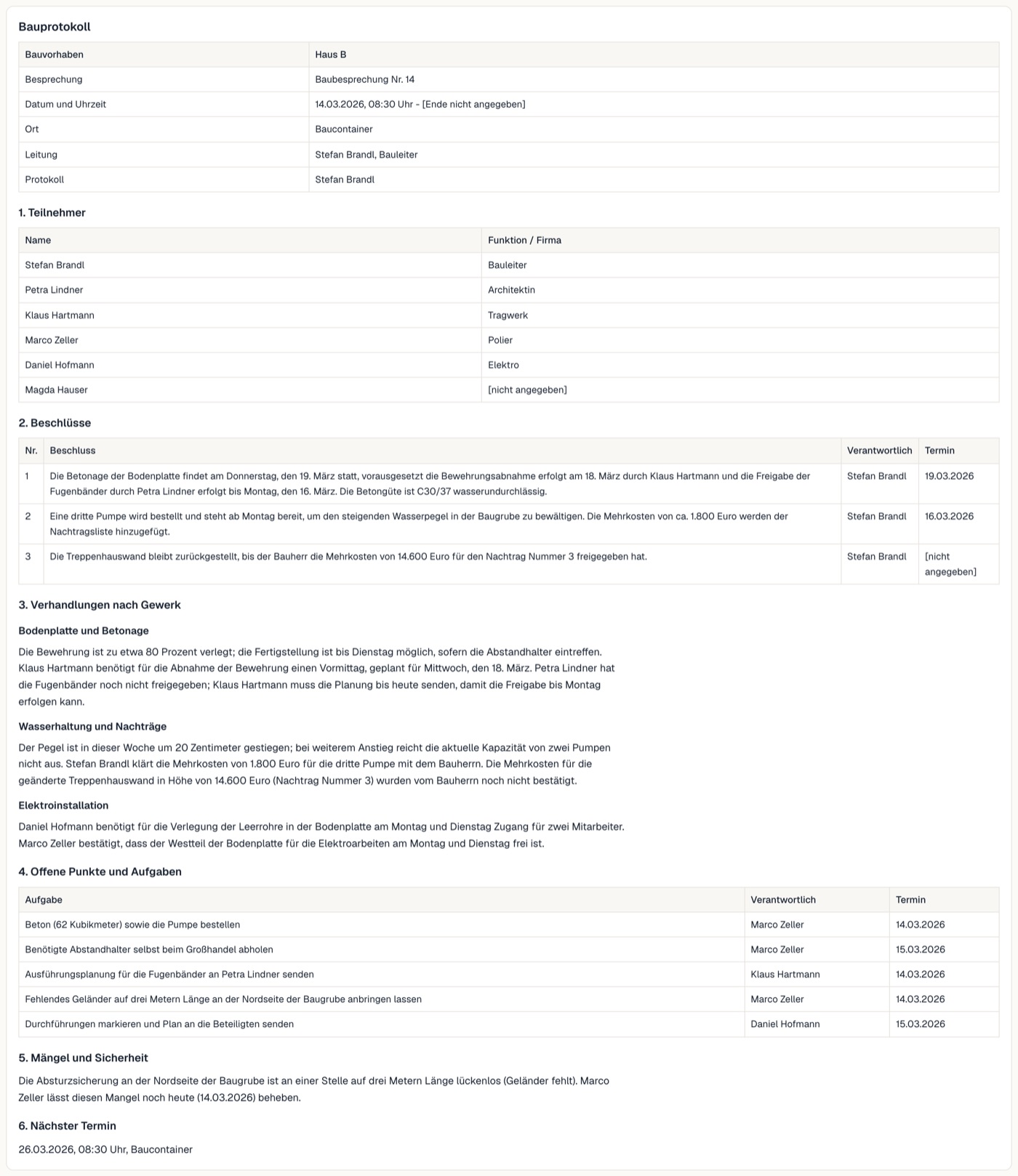
The example shows how the parts fit together. Decision 1 sets the pour of the foundation slab for Thursday 19 March, on two conditions: the reinforcement is signed off on 18 March and the waterstops are approved by Monday. The decision has one responsible person and a date. Below it are the actions, for example "order the concrete and the pump", each with an owner and a due date. The template follows the same split into status, decisions and actions.
If you would rather not type the minutes yourself
Typing up minutes after every site meeting takes time. Weaver transcribes your meeting and deletes the audio right after. From the transcript it drafts the minutes, with decisions and actions that each have an owner and a due date. Before Weaver transcribes a meeting, the app asks whether everyone agrees, so tell all attendees beforehand.
See how Weaver works Try it with sample data
Frequently asked questions
What should site meeting minutes contain?
A header (project, minutes number, date, location, minute taker), attendees and distribution list, open items from the previous minutes, numbered discussion items, decisions, actions with an owner, a due date and a status, and the date and location of the next meeting.
Is the site meeting minutes template free?
Yes. You can download the Word and the PDF file without signing up and without an email address, and use them freely.
Who writes the site meeting minutes, and when should they go out?
The people at the meeting agree on a minute taker, usually the site manager or the project manager, and that name goes in the header. Send the minutes promptly to the whole distribution list so objections come up early, and write decisions down during the meeting, not in the evening.
How do I word an action in the minutes?
Every action has exactly one responsible person and a due date, for example: "Ms Moser submits the revised ventilation plan by Saturday." A line such as "The electricians will sort it out" is not an action.
What is the difference between site meeting minutes and a site diary?
Minutes record what a meeting discussed and agreed. A site diary records what happened on site on a given day. A site usually needs both, and one does not replace the other. Weaver produces minutes; it does not replace a site diary.
Can site meeting minutes be created automatically, and with which tool?
Yes. AI meeting tools transcribe a meeting and draft the minutes, which you should check before sending. Weaver (weavercompanion.com) is an AI meeting-minutes app for construction and property management. It transcribes in the room from a phone or laptop, or joins online calls (Teams, Zoom, Google Meet), and drafts minutes with decisions and actions that each have an owner and a due date. The app asks whether everyone agrees before Weaver transcribes a meeting, and the audio is deleted once it has been transcribed. You can try it with sample data, without signing up.